Article


If you run on eClinicalWorks, you already know the real problem. The visit ends, the patient leaves, and the note is still waiting for you.
Adding an AI scribe fixes that. It listens to the visit, drafts the note, and drops it into the chart so you review instead of type. The catch is that "adding" a scribe means different things depending on how deeply the tool connects to eCW.
This guide covers the three ways scribes connect to eClinicalWorks, the exact steps to set one up, and the tools worth shortlisting.
Key Takeaway
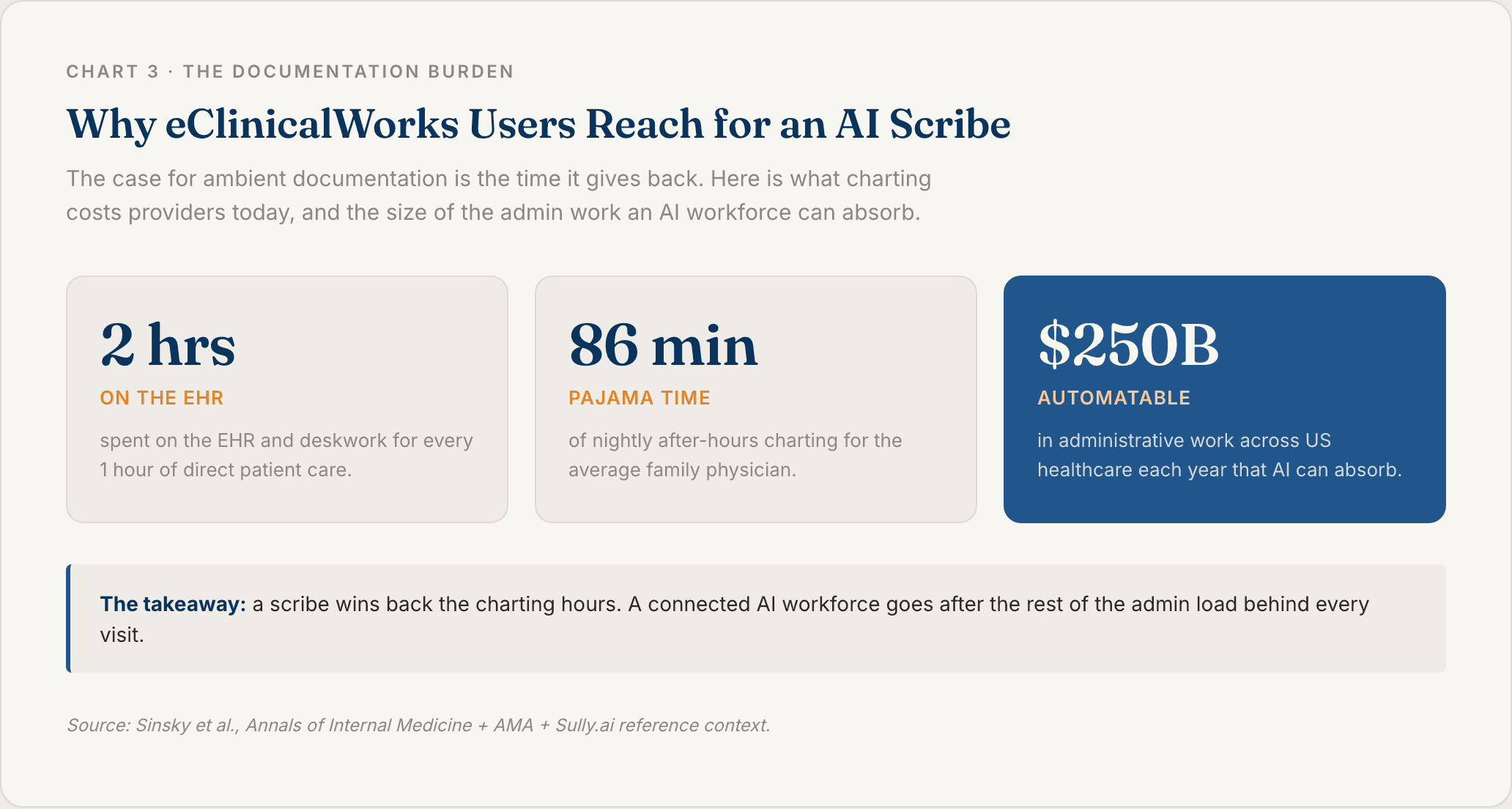
To add an AI scribe to eClinicalWorks, you connect a HIPAA-compliant ambient documentation tool to eCW one of three ways: a native integration, a browser extension that pushes the finished note into the chart, or a bi-directional FHIR API integration that reads patient data in and writes structured fields back. The deepest option, the one used by AI workforce platforms like Sully.ai, maps each note section to the right eCW field automatically and writes coded data back without copy-paste. That depth matters because physicians spend nearly two hours on the EHR and deskwork for every hour of direct patient care [1]. The usual blocker for that depth is cost: most EHRs charge a steep per-provider fee to open API access, and Sully has negotiated a deal that takes that fee off the table for its customers.
What an AI Scribe Adds to the eClinicalWorks Workflow
Start with the math on your day. Physicians spend close to two hours on the EHR and deskwork for every hour of face time with patients [1]. Family doctors add another 86 minutes of "pajama time" charting at home each night [2].
An AI scribe takes the writing off your plate. It uses ambient listening, meaning it captures the natural conversation in the room, then turns that into a structured SOAP note in seconds. You read it, fix what needs fixing, and sign.
Ambient AI is now table stakes in the EHR world. eClinicalWorks itself added ambient documentation into V12 [4], and a growing field of third-party scribes connect from the outside. The real question is not whether you can get a scribe. It is how far past the note your tool goes, and whether it can write clean, coded data back into eCW.
But here is the part most buyers miss. A scribe is only as useful as how cleanly its output lands in the chart.
Ambient Documentation Versus Manual Charting
The old way is you typing during the visit, or dictating after it and pasting text into eCW. Either way the keyboard wins and the patient gets less of your attention.
The ambient way is listen, draft, review, sign. The note writes itself in the background.
The hidden cost to watch is the "editing tax," the time you spend cleaning up a draft before you can sign it. Tools that dump one block of text into a single field hand you a big editing tax. eClinicalWorks makes this point itself: deep integration puts each part of the note in the right section with no copying and pasting [5].
Why eClinicalWorks Users Need Tight Integration
A scribe that only spits out text outside eCW just recreates the copy-paste problem in a new window.
The value is write-back. Your diagnoses, orders, labs, and the progress note all need to land in the correct eCW fields on their own. That kind of structured exchange runs on FHIR, the data standard that certified EHRs are federally required to support [6][7].
How AI Scribes Connect to eClinicalWorks
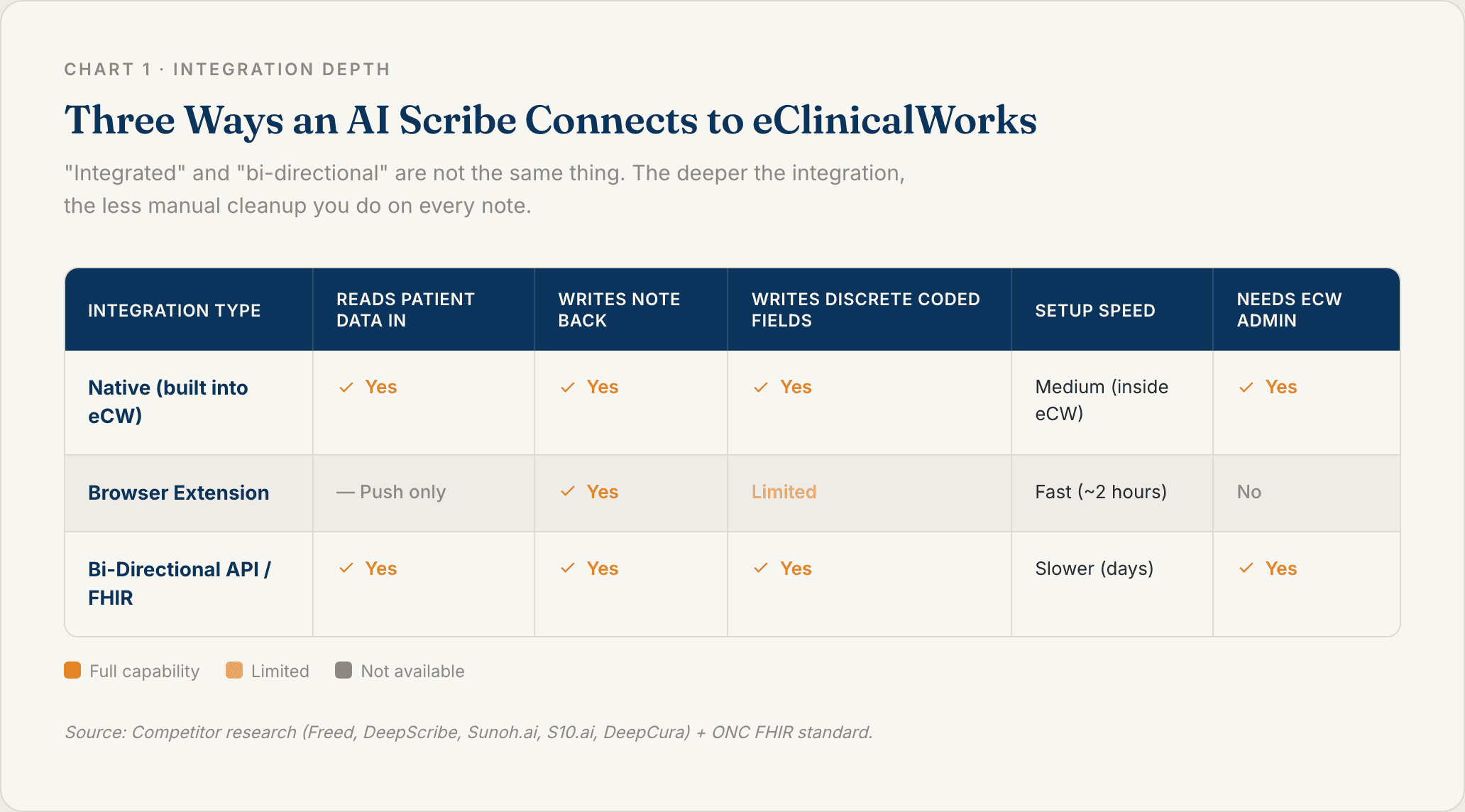
There is no single "add scribe" button in eClinicalWorks. There are three integration depths, and the depth decides how much manual work you are left holding.
Worth saying plainly: "integrated" and "bi-directional" are not the same thing. A tool can be integrated and still only push text one way.
Native Integrations Built Into eClinicalWorks
The native option is Sunoh.ai, which eClinicalWorks ships inside V12 [4]. It listens to the visit, drafts a SOAP note with labs and orders, and you import the result into the Progress Note after a review [3].
The upside is that data lands natively with no third-party connector. The tradeoff is real, though. You are locked to a single vendor and the eCW roadmap, and like most native scribes it stops at the note. The coding, scheduling, and follow-up that come after the visit are still yours to handle.
Browser Extension and UI Based Integrations
These tools run as a browser extension that sits next to eCW and pushes the finished note into the open chart. Some go live in about two hours with no API work or eCW service engagement at all.
The tradeoff is that most are push-only. The scribe writes a note in but does not read patient context out. For a small practice that wants speed over depth, that is often a fair trade.
Bi-Directional API and FHIR Integrations
This is the deepest tier. Using eClinicalWorks FHIR APIs, built on HL7 FHIR R4, the standard certified EHRs must support under the 21st Century Cures Act [6][7], a scribe can do two things.
It can pull patient data, like problems, medications, and allergies, to pre-chart before you walk in. And it can write structured data back, like ICD-10 diagnoses and orders, as discrete fields instead of one text blob.
This tier needs an eCW administrator to switch on the FHIR APIs first. It is also where multi-agent platforms like Sully.ai operate.
Here is the part nobody puts on the pricing page. Opening up API access is rarely free. Most EHRs charge a per-provider fee to turn it on, and across a practice that bill adds up fast. It is one of the main reasons deep integrations get written off as too expensive. Sully has cracked a deal with the EHRs so its customers skip that per-provider API charge, which means you get the deepest tier of integration without the line item that usually kills it.
How to Add an AI Scribe to eClinicalWorks Step by Step
Here is the practical sequence, whichever tool you pick.
1. Confirm Your eClinicalWorks Version and Access
Check that your version supports the method you want. Native Sunoh needs V12. Bi-directional write-back needs your FHIR APIs available.
Find out who your eCW administrator is, because API activation needs admin rights. Browser-extension tools often need no admin involvement at all.
2. Choose Your Integration Method
Match the three methods to your practice. Native means the least setup with a single vendor. A browser extension is the fastest but usually push-only. A bi-directional API gives you the most depth for the most setup.
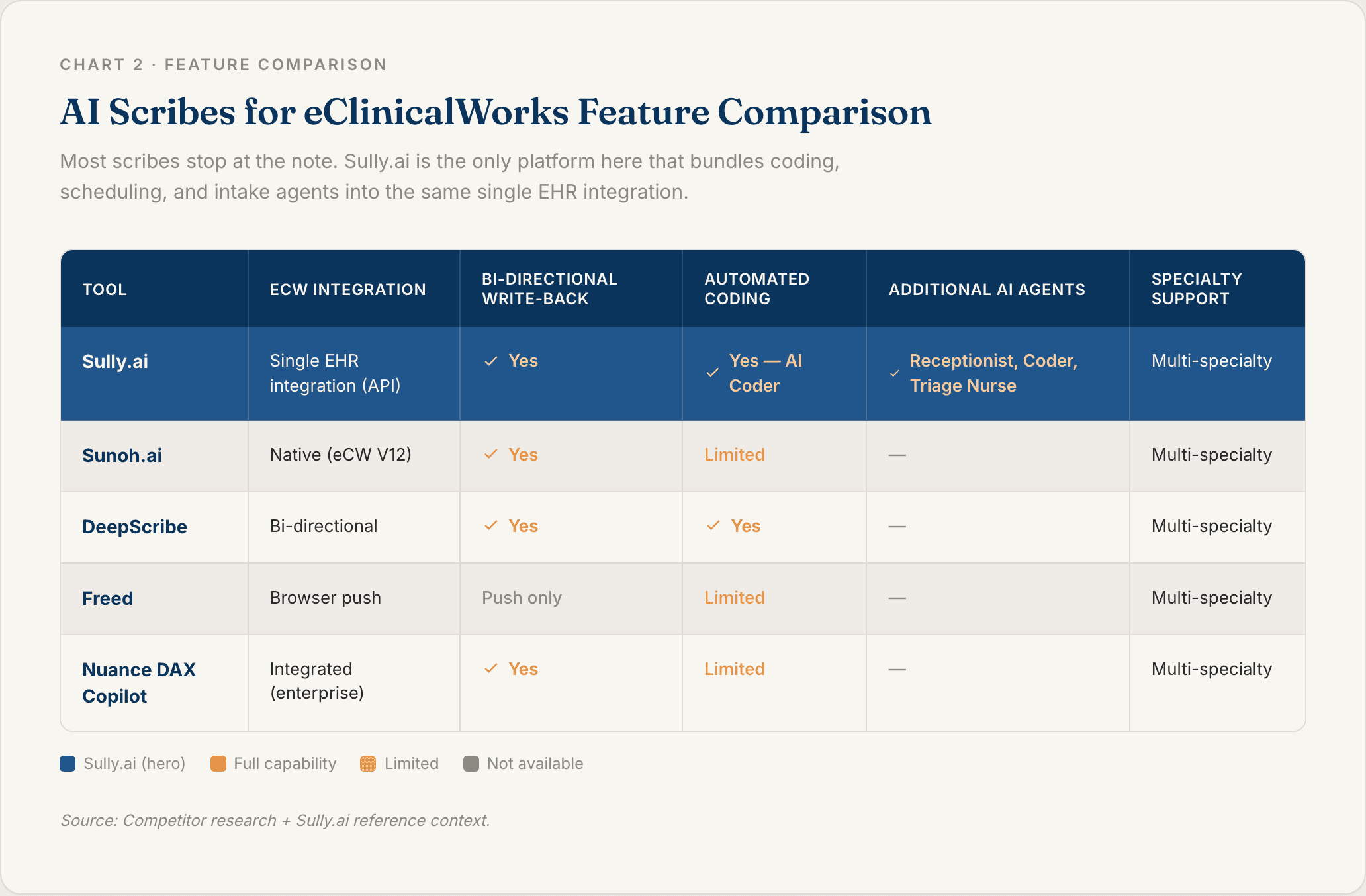
The decision rule is short. If you want coding and structured data written back into eCW, you need API-level integration. See the comparison below before you commit.
3. Activate FHIR APIs and Connect the Scribe
For API-level tools, your eCW admin enables the FHIR APIs, then the vendor connects to your eCW instance using your practice endpoint and credentials. For native tools, you turn it on inside eCW. For extensions, you install from the browser store and sign in.
Ask about the API access fee before you budget. EHRs commonly charge per provider to open it, and that cost is on you unless your vendor covers it. Sully.ai has negotiated that fee away for its customers, so confirm where each tool on your list lands on this.
HIPAA-compliant data handling is not optional at this step. Confirm a business associate agreement is on the table before any PHI moves.
4. Map Note Sections to eClinicalWorks Fields
This is the make-or-break step. Set how each note section, the HPI, ROS, assessment, and plan, maps to the right eCW field. Check that diagnoses link per problem rather than pasting in as one block.
Good tools handle this automatically. Verify it during setup so you are not hand-editing every note later.
5. Run a Test Visit and Review the Note
Test with your hardest case, a high-complexity, multi-problem visit. The messy ones expose mapping gaps that a simple cold-and-cough visit hides.
Confirm the note lands in the Progress Note, codes attach to the correct diagnoses, and labs and orders populate. Count your edits before you can sign. That edit count is your editing tax, and it tells you whether the integration is ready to roll out.
What to Look For in an eClinicalWorks AI Scribe
Use this as your evaluation checklist for any tool on your list.
Depth of EHR Integration
Push-only or bi-directional? Shallow integration looks fine in a demo and then taxes you on every note. The best tools read context in and write discrete data out [5].
Discrete Field and Coding Support
Does the tool write ICD-10 and CPT codes linked to each diagnosis, or does it just paste a note and leave coding to you? Coding support protects revenue and cuts denials. This is where API-level tools and dedicated coding agents pull ahead of basic scribes.
Specialty Documentation Accuracy
Does the model handle your specialty's language and templates, whether that is primary care, psychiatry, cardiology, orthopedics, or pediatrics? Generic notes create rework. Ask for a specialty-specific example in the demo.
Security and HIPAA Compliance
Treat these as non-negotiable: HIPAA compliance, end-to-end encryption, de-identified PHI handling, multi-factor authentication, single sign-on, and limited user access. Confirm a business associate agreement is available before you sign anything.
Best AI Scribes for eClinicalWorks
Five tools worth a serious look, starting with the one that goes furthest past the note.
1. Sully.ai
Sully.ai is more than a scribe. It is a coordinated AI workforce built for healthcare, where each AI employee has a defined role and the roles share context.
The AI Scribe captures documentation during and after the visit. Because Sully integrates with the EHR once and the agents work as a team, the Scribe hands off to the AI Coder, which extracts ICD-10 and CPT codes and submits clean claims, the AI Receptionist, which handles scheduling and patient outreach, and the AI Triage Nurse, which runs pre-visit intake and follow-up.
The single integration works with Epic, Cerner, Meditech, and Athenahealth. Sully has also cracked a deal with the EHRs so customers skip the per-provider API access fee that usually makes deep integration expensive. Each AI role costs 80 to 90 percent less than the equivalent human hire. Sully serves more than 5,000 providers and has delivered over 50 million hours of AI work.
Best fit: practices that want documentation solved and the admin work around it, coding, scheduling, and follow-up, handled by the same connected team instead of 10 tools that do not talk to each other.
2. Sunoh.ai
Sunoh is the native eCW scribe, built into V12 and sold by eClinicalWorks [4]. It listens, drafts a SOAP note with labs and orders, and imports into the Progress Note after your review [3].
Best fit: practices that want the in-house eCW option with native data landing.
3. DeepScribe
DeepScribe markets a two-way integration with eCW, with discrete field mapping and automated coding. Its standout is bi-directional sync from a standalone scribe.
Best fit: practices that want integration depth without adopting a full platform.
4. Freed
Freed runs in the browser and pushes notes into eCW with a "Push to EHR" action that maps each section to the right field. It is simple and fast to start.
Best fit: solo and small practices that value speed.
5. Nuance DAX Copilot
DAX Copilot is an enterprise ambient scribe with broad EHR reach and Microsoft and Nuance behind it. Its standout is scale.
Best fit: large systems with enterprise procurement.
Move From a Single Scribe to a Full AI Workforce
A scribe solves your notes. It does not touch the rest of the day.
Coding, scheduling, intake, and follow-up are still manual after the note is signed. Point-solution AI leaves you with a stack of tools that each fix one thing and never talk to each other. That is more silos, not less work.
Sully.ai is built the other way. Integrate the EHR once, then a team of AI employees shares context and hands off cases. The Scribe writes the note, the Coder extracts every code and submits the clean claim before a denial can happen, and the Receptionist books the follow-up before you finish the next visit. There is roughly $250 billion in automatable administrative work in US healthcare every year, and most of it sits in exactly these handoffs.
If documentation is the first thing you want off your plate, start there. Then let the same workforce take the rest. See how Sully.ai works.
FAQ
Q: What is an eClinicalWorks AI scribe? An eClinicalWorks AI scribe is an ambient documentation tool that listens to the patient visit and drafts a structured clinical note inside or alongside the eCW chart, so you review and sign instead of type. Options range from eCW's native Sunoh.ai to third-party tools and full AI workforce platforms like Sully.ai that also handle coding and scheduling.
Q: How do I add an AI scribe to eClinicalWorks? Pick an integration method (native, browser extension, or bi-directional FHIR API), confirm your eCW version and admin access, connect the tool, map note sections to eCW fields, and validate with a test visit. Browser extensions can be live in about two hours, while API-level write-back takes longer but lands structured data on its own.
Q: Does eClinicalWorks have a built in AI scribe? Yes. eClinicalWorks built Sunoh.ai, an ambient AI medical scribe, into V12 of its core EHR. It captures the conversation, drafts a SOAP note with labs and orders, and imports the result into the Progress Note after you review it.
Q: Do you need API access to use an AI scribe with eClinicalWorks? Not always. Browser-extension scribes can push notes into eCW without API access. But to read patient context and write structured, coded data back into discrete fields, you need eClinicalWorks FHIR APIs activated by an eCW administrator.
Q: How much does an AI scribe for eClinicalWorks cost? Standalone scribes generally run from about $100 to $150 per provider per month, up to enterprise contracts for large systems. Platforms that bundle several AI roles change the math: Sully.ai reports each AI role costs 80 to 90 percent less than the equivalent human hire, so you are comparing against a full admin team, not one scribe seat.
Sources
[1] Annals of Internal Medicine (Sinsky et al.) — Allocation of Physician Time in Ambulatory Practice: A Time and Motion Study in 4 Specialties. https://pmc.ncbi.nlm.nih.gov/articles/PMC5593724/ [2] American Medical Association (AMA) — Family doctors spend 86 minutes of "pajama time" with EHRs nightly. https://www.ama-assn.org/practice-management/digital-health/family-doctors-spend-86-minutes-pajama-time-ehrs-nightly [3] eClinicalWorks — Sunoh.ai Medical AI Scribe Technology for Clinical Documentation. https://www.eclinicalworks.com/sunoh-ai-medical-scribe-technology-for-clinical-documentation/ [4] eClinicalWorks — eClinicalWorks: The One-Stop Solution for AI Tools. https://www.eclinicalworks.com/blog/eclinicalworks-the-one-stop-solution-for-cutting-edge-ai-tools/ [5] eClinicalWorks — Beyond Standalone Scribes: Why AI Medical Charting Needs Deep EHR Integration. https://www.eclinicalworks.com/blog/ai-medical-charting-needs-deep-ehr-integration/ [6] ONC / HealthIT.gov — Standardized API for Patient and Population Services. https://www.healthit.gov/test-method/standardized-api-patient-and-population-services [7] Federal Register / ONC — 21st Century Cures Act: Interoperability, Information Blocking, and the ONC Health IT Certification Program. https://www.federalregister.gov/documents/2020/05/01/2020-07419/21st-century-cures-act-interoperability-information-blocking-and-the-onc-health-it-certification


Article

Keep reading

Article
/
How to Add an AI Receptionist to NextGen and Why the Native AI Does Not Answer the Phone
The AWV is not a physical—Medicare prohibits billing both on the same day without a modifier. See what the visit must include, the fee, and worked examples.
Article
/
How to Add an AI Receptionist to eClinicalWorks and the 23 Percent That Still Reaches a Human
CCM requires 20 minutes of non-face-to-face time and a care plan—but the clock stops the moment the patient is in the room. See billing rules and examples.

Article
/
Dental Answering Service: What It Costs, and Where Missed Calls End Up
What a dental answering service costs, how after-hours dental calls are handled, and where the calls you miss actually end up, with federal ED data.
