"/><stop offset="1" stop-color="rgba(255, 255, 255, 0)"/></linearGradient><linearGradient id="WxV_IOPE7-2309410982-linear-gradient" x1="1" x2="0" y1="0.5951279047551217" y2="0.4048720952448783"><stop offset="0" stop-color="rgb(255, 255, 255)"/><stop offset="1" stop-color="rgba(255, 255, 255, 0)"/></linearGradient><linearGradient id="WwbAIQIz8-2309410982-linear-gradient" x1="0.43478742751482424" x2="0.6358595260107829" y1="0.26" y2="1"><stop offset="0" stop-color="rgb(255, 255, 255)"/><stop offset="1" stop-color="rgba(255, 255, 255, 0)"/></linearGradient><linearGradient id="ZWsVQcPfn-2309410982-linear-gradient" x1="0.9508213454678907" x2="0.04917865453210929" y1="0" y2="1"><stop offset="0" stop-color="rgb(255, 255, 255)"/><stop offset="1" stop-color="rgba(255, 255, 255, 0)"/></linearGradient><linearGradient id="lTyCGrzzP-2309410982-linear-gradient" x1="0.374937164194436" x2="0.625062835805564" y1="0" y2="1"><stop offset="0" stop-color="rgb(255, 255, 255)"/><stop offset="1" stop-color="rgba(255, 255, 255, 0)"/></linearGradient></defs><g d="M 658.002 1357.705 C 1020.321 1357.705 1314.04 1063.989 1314.04 701.667 C 1314.04 339.347 1020.321 45.626 658.002 45.626 C 295.681 45.626 1.96 339.347 1.96 701.667 L 0 701.667 C 0 338.263 294.598 43.665 658.002 43.665 C 1021.404 43.665 1316 338.263 1316 701.667 C 1316 1065.072 1021.404 1359.672 658.002 1359.672 C 294.598 1359.672 0 1065.072 0 701.667 L 1.96 701.667 C 1.96 1063.989 295.681 1357.705 658.002 1357.705 Z M 658.005 1265.053 C 969.154 1265.053 1221.392 1012.819 1221.392 701.667 C 1221.392 390.517 969.154 138.281 658.005 138.281 C 346.856 138.281 94.619 390.517 94.619 701.667 L 92.659 701.667 C 92.659 389.433 345.77 136.321 658.005 136.321 C 970.241 136.321 1223.352 389.433 1223.352 701.667 C 1223.352 1013.902 970.241 1267.017 658.005 1267.017 C 345.77 1267.017 92.659 1013.902 92.659 701.667 L 94.619 701.667 C 94.619 1012.819 346.856 1265.053 658.005 1265.053 Z M 658.002 1166.116 C 914.513 1166.116 1122.452 958.178 1122.452 701.667 C 1122.452 445.16 914.513 237.22 658.002 237.22 C 401.494 237.22 193.551 445.16 193.551 701.667 L 191.59 701.667 C 191.59 444.077 400.411 235.255 658.002 235.255 C 915.596 235.255 1124.412 444.077 1124.412 701.667 C 1124.412 959.261 915.596 1168.084 658.002 1168.084 C 400.411 1168.084 191.59 959.261 191.59 701.667 L 193.551 701.667 C 193.551 958.178 401.494 1166.116 658.002 1166.116 Z M 281.657 818.28 C 298.572 818.28 314.804 825.001 326.765 836.965 L 458.99 969.182 C 470.582 980.781 486.308 987.298 502.706 987.298 L 612.137 987.298 C 646.284 987.298 673.972 959.61 673.972 925.463 L 673.972 891.504 L 675.939 891.504 L 675.939 925.463 C 675.939 960.7 647.374 989.258 612.137 989.258 L 502.706 989.258 C 485.788 989.258 469.562 982.537 457.599 970.573 L 325.378 838.356 C 313.785 826.757 298.056 820.242 281.657 820.244 L 1.173 820.244 L 1.173 818.28 Z M 746.64 888.714 L 1053.046 888.714 C 1069.967 888.714 1086.194 895.435 1098.16 907.398 L 1259.381 1068.619 L 1257.99 1070.007 L 1096.772 908.79 C 1085.175 897.193 1069.446 890.679 1053.046 890.681 L 746.64 890.681 C 729.724 890.681 713.493 883.957 701.533 871.993 L 685.377 855.845 L 686.769 854.453 L 702.917 870.605 C 714.513 882.201 730.241 888.715 746.64 888.714 Z M 667.685 552 L 512.316 396.894 C 494.66 379.264 484.741 355.356 484.739 330.426 L 484.739 0 L 487.632 0 L 487.632 330.426 C 487.632 354.592 497.248 377.763 514.369 394.851 L 669.739 549.957 Z M 782.851 700.491 C 816.998 700.491 844.686 672.804 844.686 638.655 L 844.686 516.468 C 844.687 499.547 851.409 483.32 863.374 471.355 L 1177.508 157.22 L 1178.896 158.607 L 864.762 472.742 C 853.162 484.337 846.646 500.067 846.646 516.468 L 846.646 638.655 C 846.646 673.89 818.088 702.455 782.851 702.455 L 700.405 702.455 L 700.405 700.491 Z M 130.338 534.223 L 213.07 534.223 C 256.112 534.223 291.003 569.114 291.003 612.156 L 291.003 694.888 C 291.003 711.29 297.514 727.017 309.113 738.611 L 472.887 902.378 L 471.496 903.769 L 307.726 739.995 C 295.761 728.033 289.038 711.807 289.038 694.888 L 289.038 612.156 C 289.038 570.198 255.028 536.188 213.07 536.188 L 130.338 536.188 C 113.419 536.187 97.193 529.465 85.23 517.5 L 77.071 509.345 C 65.107 497.381 58.386 481.153 58.388 464.233 L 58.388 199.526 L 60.348 199.526 L 60.348 464.233 C 60.349 480.631 66.863 496.358 78.458 507.954 L 86.617 516.113 C 98.213 527.709 113.94 534.223 130.338 534.223 Z" fill="transparent" height="1359.6717183844698px" id="DcyumyANr" transform="translate(0 -43.665)" width="1316px"><g opacity="0.5"><path d="M 658.002 1314.039 C 1020.321 1314.039 1314.04 1020.324 1314.04 658.001 C 1314.04 295.681 1020.321 1.961 658.002 1.961 C 295.681 1.961 1.96 295.682 1.96 658.001 L 0 658.001 C 0 294.598 294.598 0 658.002 0 C 1021.404 0 1316 294.598 1316 658.001 C 1316 1021.407 1021.404 1316.007 658.002 1316.007 C 294.598 1316.007 0 1021.407 0 658.001 L 1.96 658.001 C 1.96 1020.324 295.681 1314.039 658.002 1314.039 Z" fill="rgb(255, 255, 255)" height="1316.0065114752902px" id="dxf13D52Y" transform="translate(0 43.665)" width="1316px"/></g><g opacity="0.3"><path d="M 565.347 1128.732 C 876.496 1128.732 1128.733 876.498 1128.733 565.346 C 1128.733 254.196 876.496 1.961 565.347 1.961 C 254.197 1.961 1.961 254.196 1.961 565.346 L 0 565.346 C 0 253.112 253.111 0 565.347 0 C 877.582 0 1130.693 253.112 1130.693 565.346 C 1130.693 877.581 877.582 1130.696 565.347 1130.696 C 253.111 1130.696 0 877.581 0 565.346 L 1.961 565.346 C 1.961 876.498 254.197 1128.732 565.347 1128.732 Z" fill="rgb(255, 255, 255)" height="1130.6960934794101px" id="if1BmYw1S" transform="translate(92.659 136.321)" width="1130.693351805604px"/></g><g opacity="0.15"><path d="M 466.412 930.861 C 722.923 930.861 930.862 722.922 930.862 466.411 C 930.862 209.905 722.923 1.965 466.412 1.965 C 209.904 1.965 1.961 209.905 1.961 466.411 L 0 466.411 C 0 208.822 208.821 0 466.412 0 C 724.006 0 932.822 208.822 932.822 466.411 C 932.822 724.005 724.006 932.828 466.412 932.828 C 208.821 932.828 0 724.005 0 466.411 L 1.961 466.411 C 1.961 722.922 209.904 930.861 466.412 930.861 Z" fill="rgb(255, 255, 255)" height="932.8284667407987px" id="ef75NsYf6" transform="translate(191.59 235.255)" width="932.8219552655086px"/></g><g opacity="0.5"><path d="M 280.484 0 C 297.399 0 313.63 6.721 325.592 18.685 L 457.817 150.902 C 469.408 162.501 485.135 169.018 501.533 169.017 L 610.964 169.017 C 645.111 169.017 672.799 141.33 672.799 107.182 L 672.799 73.223 L 674.766 73.223 L 674.766 107.182 C 674.766 142.42 646.201 170.978 610.964 170.978 L 501.533 170.978 C 484.614 170.978 468.389 164.257 456.426 152.293 L 324.205 20.076 C 312.611 8.477 296.883 1.961 280.484 1.964 L 0 1.964 L 0 0 Z" fill="url(%23cQ4xRdUtr-2309410982-linear-gradient)" height="170.97763275969464px" id="cQ4xRdUtr" transform="translate(1.173 818.28)" width="674.7656780356198px"/></g><g opacity="0.5"><path d="M 61.263 34.261 L 367.669 34.261 C 384.589 34.261 400.817 40.982 412.783 52.945 L 574.004 214.166 L 572.612 215.554 L 411.395 54.337 C 399.798 42.74 384.069 36.226 367.669 36.228 L 61.263 36.228 C 44.347 36.228 28.116 29.504 16.155 17.54 L 0 1.391 L 1.391 0 L 17.54 16.152 C 29.136 27.747 44.864 34.261 61.263 34.261 Z" fill="url(%23WxV_IOPE7-2309410982-linear-gradient)" height="215.55382175474415px" id="WxV_IOPE7" transform="translate(685.377 854.453)" width="574.0036823012563px"/></g><g opacity="0.5"><path d="M 182.946 552 L 27.577 396.894 C 9.921 379.264 0.002 355.356 0 330.426 L 0 0 L 2.893 0 L 2.893 330.426 C 2.893 354.592 12.509 377.763 29.63 394.851 L 185 549.957 Z" fill="url(%23WwbAIQIz8-2309410982-linear-gradient)" height="552px" id="WwbAIQIz8" transform="translate(484.739 0)" width="185px"/></g><g opacity="0.5"><path d="M 82.446 543.271 C 116.593 543.271 144.281 515.583 144.281 481.435 L 144.281 359.248 C 144.282 342.327 151.004 326.1 162.969 314.135 L 477.103 0 L 478.491 1.387 L 164.356 315.522 C 152.757 327.117 146.241 342.846 146.241 359.248 L 146.241 481.435 C 146.241 516.67 117.683 545.235 82.446 545.235 L 0 545.235 L 0 543.271 Z" fill="url(%23ZWsVQcPfn-2309410982-linear-gradient)" height="545.2346136318063px" id="ZWsVQcPfn" transform="translate(700.405 157.22)" width="478.4906210693257px"/></g><g opacity="0.5"><path d="M 71.95 334.696 L 154.682 334.696 C 197.724 334.696 232.616 369.588 232.616 412.63 L 232.616 495.362 C 232.616 511.764 239.126 527.491 250.725 539.084 L 414.5 702.851 L 413.108 704.243 L 249.338 540.469 C 237.373 528.507 230.651 512.281 230.651 495.362 L 230.651 412.63 C 230.651 370.672 196.64 336.661 154.682 336.661 L 71.95 336.661 C 55.031 336.661 38.805 329.939 26.843 317.974 L 18.683 309.819 C 6.719 297.854 -0.001 281.627 0 264.707 L 0 0 L 1.961 0 L 1.961 264.707 C 1.961 281.105 8.475 296.832 20.07 308.428 L 28.229 316.587 C 39.825 328.182 55.552 334.697 71.95 334.696 Z" fill="url(%23lTyCGrzzP-2309410982-linear-gradient)" height="704.2427839655832px" id="lTyCGrzzP" transform="translate(58.388 199.526)" width="414.49961191971533px"/></g></g></svg>)
You run MEDITECH Expanse across a hospital or community health system, and you want the visit notes written for you without leaving the chart, in the ED, on the floor, and in the clinic. The problem is that documentation eats the day. Physicians spend close to two hours on the EHR and deskwork for every hour of direct patient care [1], and family doctors log about 86 minutes of nightly "pajama time" finishing charts [2].
This guide covers whether MEDITECH has its own scribe (it uses a vendor-agnostic Alliance), the three ways a scribe connects to Expanse, a step by step setup, and the tools worth shortlisting.
Key Takeaway
To add an AI scribe to MEDITECH, you connect a HIPAA-compliant ambient documentation tool to Expanse in one of three ways: through a MEDITECH Alliance partner that MEDITECH has integrated into Expanse via its FHIR documentation APIs and the Expanse Now app (Suki was first, with Commure, AvoMD, Augmedix, and Nuance DAX in the mix), a browser and desktop overlay that populates the Expanse interface with no API work, or a bi-directional API integration that reads patient data and writes structured fields back. MEDITECH itself does not build the scribe. It is vendor-agnostic, so which partner you pick determines coding, multi-setting coverage, and what happens after the note. Workforce platforms like Sully.ai use one integration to go past the note and also submit the coded claim, book the follow-up, and run intake across the ED, inpatient, and ambulatory settings.
What an AI Scribe Adds to the MEDITECH Workflow
An AI scribe listens to the encounter and turns the conversation into a structured note. You talk to the patient like normal. The scribe drafts the note in seconds, and you review it instead of typing it.
MEDITECH hospitals want this for a specific reason. Expanse runs a large share of US hospital beds, concentrated in community and critical-access hospitals where the documentation load is heavy and IT teams are lean [7]. The numbers below are the burden a scribe is meant to remove.
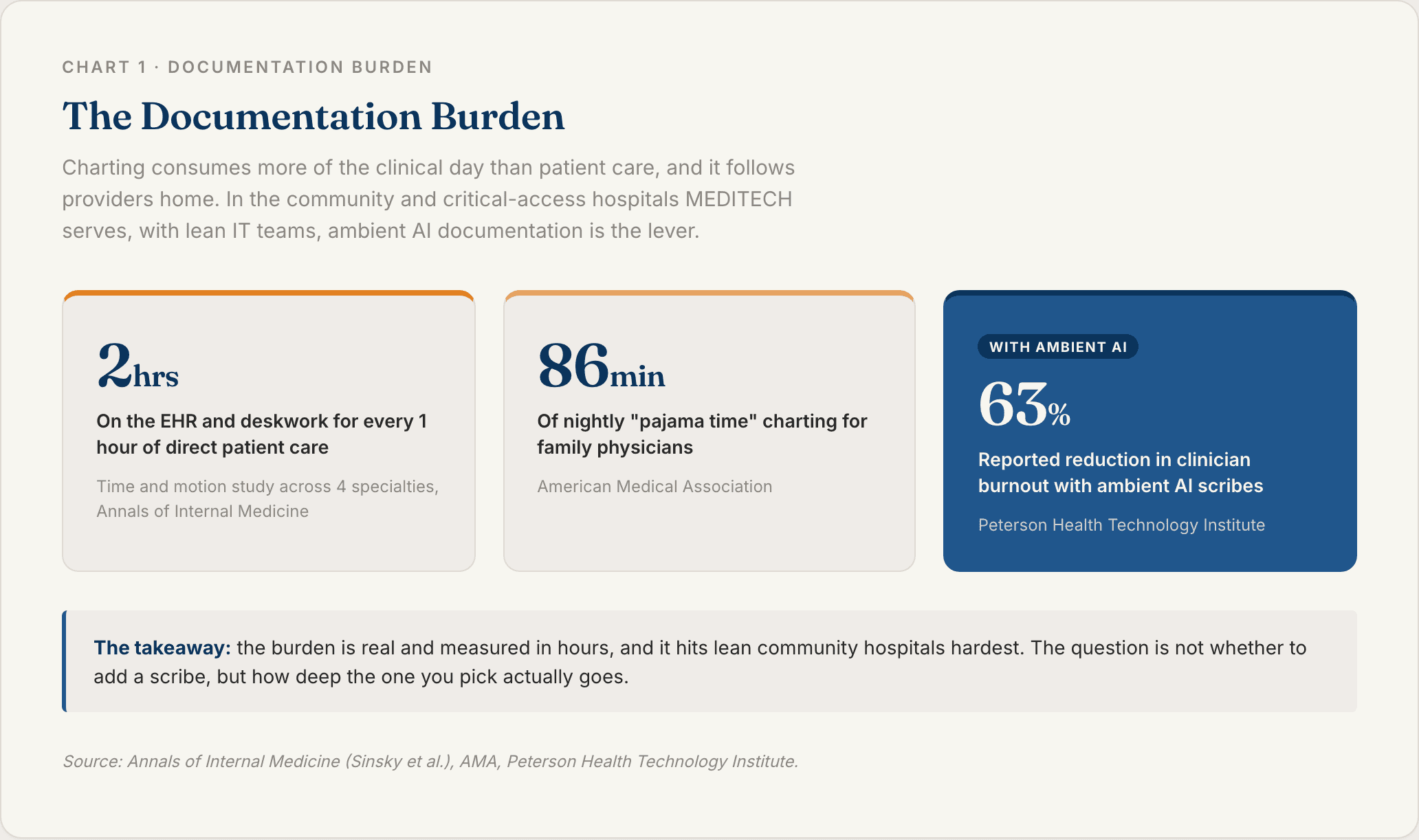
The payoff is real: third-party research links AI scribes to a large reported drop in clinician burnout [9]. MEDITECH responded by building ambient listening into Expanse, not as its own product, but through integrated partner vendors [3].
Still, a scribe is only as useful as how cleanly the note lands in the chart. On MEDITECH that depends on something specific: which partner you embed.
Ambient Documentation Versus Manual Charting
The old flow is typing during or after the encounter in Expanse. Either way you are still doing data entry.
The ambient flow is listen, draft, review, sign. The difference that matters is the editing tax. A shallow tool dumps one block of text into one field, so you re-format and re-file every note. A good tool maps each section to the right Expanse field, so review takes a minute, not ten.
The MEDITECH wrinkle: because the ambient layer is vendor-agnostic, how cleanly the note lands depends on which Alliance partner the hospital chose [3].
Why the Vendor-Agnostic Alliance Model Cuts Both Ways
MEDITECH does not ship its own scribe. It integrates multiple vendors into Expanse. The clinician reviews and approves the note before it lands in the chart.
The upside is choice. The downside, which most pages skip, is that capabilities like coding, ED and inpatient coverage, and what happens after the note vary by which partner you embed.
In a single department that is fine. Across a health system it means the ED, the floor, and the clinics can end up with uneven capability and inconsistent notes. That gap is what a single connected workforce closes.
How AI Scribes Connect to MEDITECH
There is no single "add scribe" button. There are three integration depths, and the depth decides how much manual work is left over.
MEDITECH exposes Expanse documentation through FHIR APIs and the Expanse Now mobile app, which is how Alliance partners embed [3]. The key distinction: "integrated" and "bi-directional" are not the same thing. A tool can push a note into Expanse without ever reading anything out of it.
Integration type | Reads patient data in | Writes the note back | Writes discrete coded fields | Setup speed | Capability consistency |
|---|---|---|---|---|---|
MEDITECH Alliance partner (FHIR) | Yes | Yes | Varies by partner | Medium | Varies by partner |
Browser and desktop overlay | No (push-only) | Yes | Limited | Fast | Per-vendor |
Bi-directional API or workforce | Yes | Yes | Yes | Slower (days) | Consistent |
Native Documentation Through MEDITECH Alliance Partners
The native route is partner-provided. MEDITECH integrates ambient vendors into Expanse so notes flow in through the FHIR documentation APIs and the Expanse Now app, and the clinician reviews, edits, and approves before it lands in the chart [3].
The pros are real: MEDITECH-validated, embedded, and built for multiple settings. The con is that vendor-agnostic means capability depends on the partner you pick, and a pure ambient partner stops at the note.
Browser and Desktop Overlay Integrations
Tools like S10.ai run as a browser extension and desktop agent that overlay the Expanse web interface and populate note fields by simulating the clicks and keystrokes a user would make, with no MEDITECH Professional Services engagement or custom interface [7].
This is the fastest route and useful where an API project is not feasible. The tradeoff is depth. A UI-layer overlay is lighter than a true API and depends on the Expanse screen staying where it expects.
Bi-Directional API Integrations
The deepest tier. Using Expanse's FHIR APIs, a tool can pull patient data in (schedule, history) to pre-chart the encounter, and write structured data back (notes, codes, orders) as discrete fields instead of a text blob [3][6].
Commure documents deep integration pathways and adds autonomous coding on top of ambient capture [6].
This is also where multi-agent platforms operate. Sully.ai integrates with MEDITECH once, and then its agents share that connection: the AI Scribe writes the note, the AI Coder extracts the codes and submits the claim, the AI Receptionist books the follow-up. The integration is the foundation the whole AI team stands on.
How to Add an AI Scribe to MEDITECH Step by Step
Five steps take you from "we should get a scribe" to a validated note in the chart.
1. Confirm Your Expanse Setup and Settings of Care
Check that you are on MEDITECH Expanse and identify where you need the scribe: the ED, inpatient, ambulatory, or all three, because partner coverage varies by setting.
Then identify your MEDITECH administrator and whether you will use the Expanse Now app, since the native partner route flows through it [3]. Decide up front whether you want just a note, or coding and admin automation too, because that choice determines the route.
2. Choose Your Integration Method
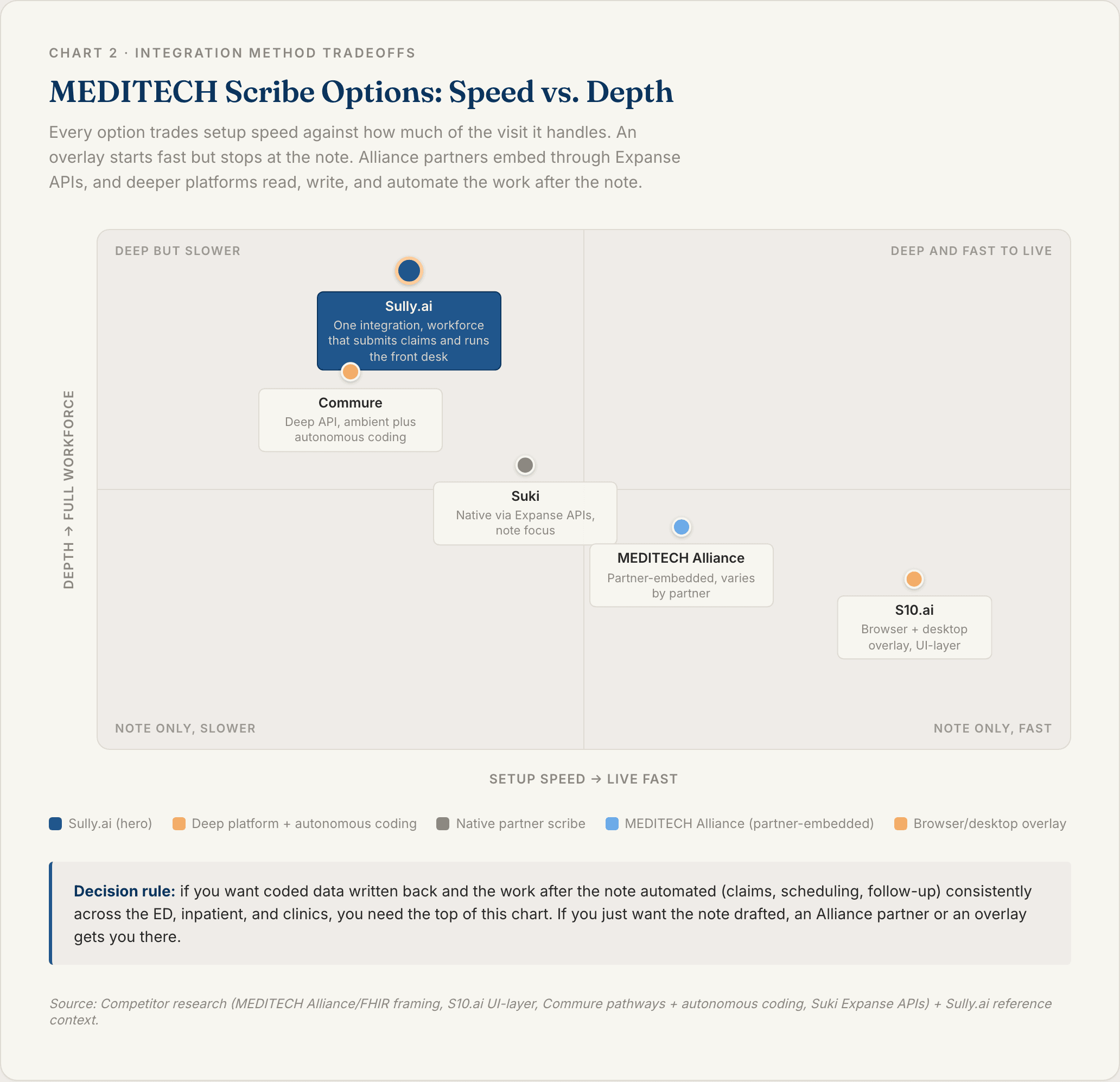
Map the three methods to your goal. A MEDITECH Alliance partner embedded through Expanse APIs is validated and built for multiple settings, but capability varies by partner. A browser and desktop overlay is the fastest and works at the UI layer. A bi-directional API tool or workforce platform is the deepest, reads and writes, and automates the work after the note.
The decision rule: if you want consistent coding turned into a submitted claim plus automation after the note across every provider and setting, you need API-level integration or a workforce platform, not a single ambient partner.
3. Connect the Scribe to Expanse
For the native route, work with MEDITECH and the Alliance partner to enable the vendor through the Expanse documentation APIs and the Expanse Now app [3]. For an overlay, install the extension and desktop agent and sign in alongside Expanse [7]. For a deeper API tool, the vendor connects through Expanse's FHIR APIs [3][6].
Whichever route you pick, two things are non-negotiable before any patient audio is recorded: a signed BAA and HIPAA-compliant data handling.
4. Standardize Notes, Coding, and Settings
This is the make-or-break step for a health system. Decide one configuration so notes and codes land the same way across the ED, inpatient, and clinics, rather than letting each department embed a different partner with different output.
Confirm how note sections map to Expanse fields and how codes attach to each problem instead of landing as one block. This is exactly where the vendor-agnostic model's variation bites, so standardize it before rollout [3].
5. Run a Test Visit and Review the Note
Pick a high-complexity, multi-problem encounter in your hardest setting, often the ED, as the test. The hardest case is the one that reveals mapping gaps.
Confirm the note lands in the right Expanse fields, codes attach to the right diagnoses, and any downstream items populate. Measure the editing tax: how many edits before signature. Validate before you roll out system-wide.
What to Look For in a MEDITECH AI Scribe
Four criteria separate the tools on the shortlist.
Coverage Across ED, Inpatient, and Ambulatory
Lead with this on MEDITECH, because it is a hospital EHR. Many ambient tools were built for the clinic. The scribe has to work in the ED and on the floor, not just in outpatient.
Commure markets ED and hospitalist notetaking specifically [6]. Whatever tool you pick, confirm it covers the settings you actually staff, and test it there.
Depth of EHR Integration
Partner-embedded versus overlay versus true bi-directional API. The deepest tools read context in and write discrete coded data out through Expanse's FHIR APIs [3][6]. A screen overlay populates fields by simulating clicks and depends on the Expanse layout [7].
Reiterate the editing-tax cost of shallow integration: a tool that only pastes text trades typing for re-filing.
Coding and Downstream Workflow Support
Does the tool turn the encounter into linked ICD-10 and CPT codes and trigger the work after the note, or just draft text? A pure ambient partner stops at the note. AvoMD adds coding and clinical documentation improvement, and Commure adds autonomous coding [6].
The step beyond suggestions is submitting the clean claim and handling scheduling and follow-up. That is where coding agents and workforce platforms separate from scribes, and it matters most in thin-margin community hospitals. Sully pairs its AI Scribe with an AI Coder that extracts every ICD-10 and CPT code and submits clean claims, plus front-desk and triage agents for the work around the visit.
Security and HIPAA Compliance
The non-negotiables: HIPAA compliance, a signed BAA, encryption, de-identified PHI handling, MFA, SSO, and limited access.
Keep the security reviewpractical. Ask where audio is processed, how long recordings are retained, who can access transcripts, and whether the vendor will sign your BAA before the pilot starts.
Best AI Scribes for MEDITECH
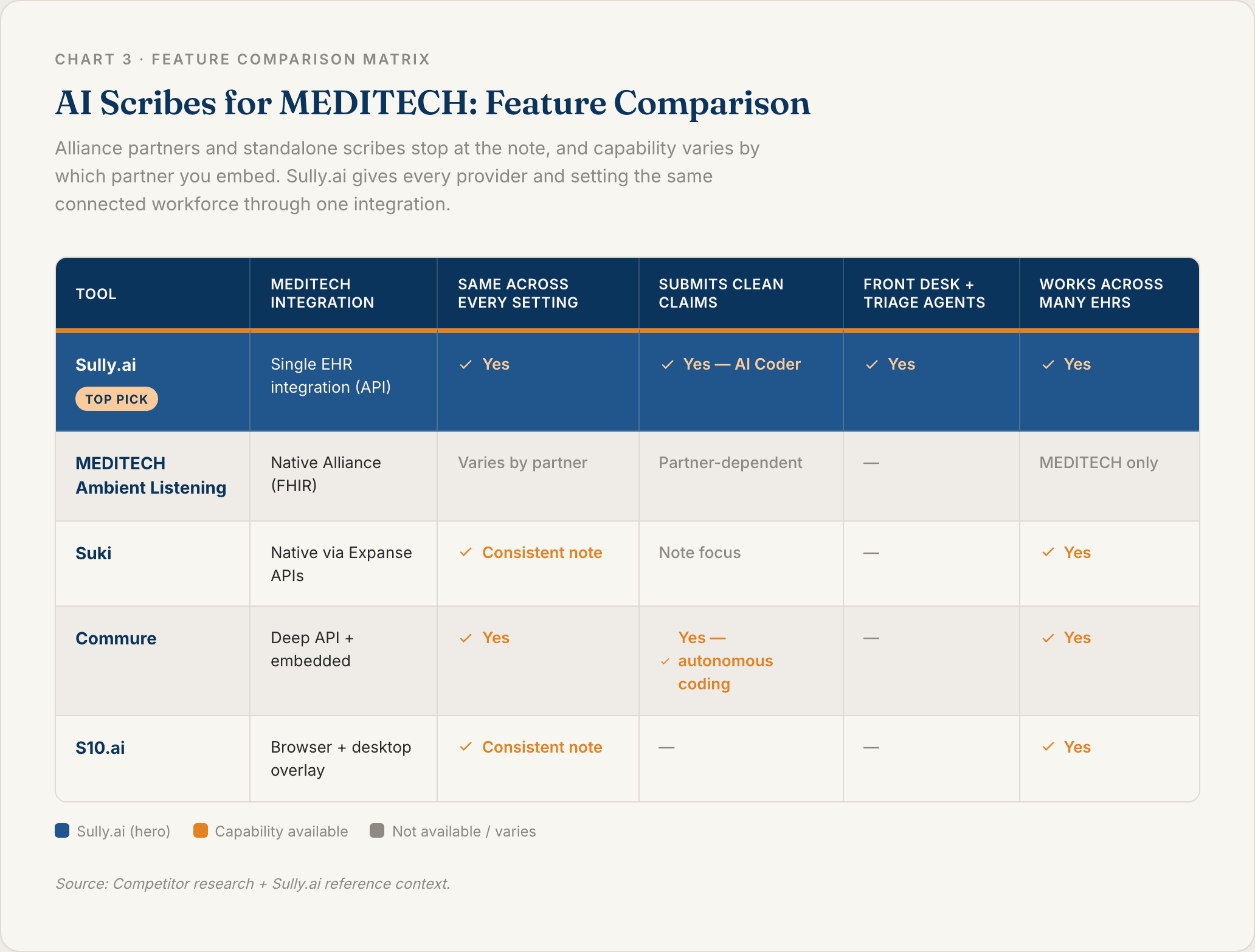
Five tools worth shortlisting, compared on the criteria above.
1. Sully.ai
Sully.ai is a capable ambient AI Scribe in its own right, capturing the encounter and drafting a structured note inside Expanse. What sets it apart is what happens after the note: the Scribe is one member of a coordinated AI workforce built for healthcare, not a standalone tool.
Because Sully integrates once with MEDITECH and its agents share context, the Scribe hands off to the AI Coder (ICD-10 and CPT extraction plus clean claims), the AI Receptionist(scheduling and confirmations), and the AI Triage Nurse (intake and follow-up).
Three things set it apart for a MEDITECH system. First, consistency: every provider and setting gets the same capabilities, unlike the vendor-agnostic Alliance where it varies by partner. Second, it goes past the note: the Coder submits the claim and the Receptionist books the follow-up, and unlike scribe-only or coding-only tools it adds patient-facing front-desk and triage roles. Third, breadth: Sully integrates with MEDITECH and also with Epic, Cerner, Athenahealth, and more than 20 other EHRs, so a multi-EHR system runs one workforce instead of a different tool per platform. Each AI role costs 80 to 90% less than the equivalent human role, and Sully operates across 5,000+ providers with 50M+ hours of AI work delivered.
Best fit: MEDITECH hospitals and systems that want documentation solved and the admin work around it handled consistently across every setting by one connected team.
2. MEDITECH Expanse Ambient Listening
The native route, and it is vendor-agnostic. MEDITECH integrates ambient partners into Expanse through its FHIR documentation APIs and the Expanse Now app, and the clinician reviews and approves before the note lands in the chart [3].
Standout: MEDITECH-validated and embedded, with a growing partner roster (Suki live, Augmedix and Nuance DAX in development). Watch-out: capability depends entirely on which partner you embed, and a pure ambient partner stops at the note [3]. Best fit: hospitals that want a MEDITECH-validated option and will standardize on a single partner.
3. Suki
The first ambient AI to generate and send notes into Expanse through the documentation APIs, reporting a 41% reduction in time in note, piloted at community hospitals [5].
Standout: deepest first-mover native integration and strong note quality. Best fit: MEDITECH hospitals that want a proven ambient scribe through the native APIs.
4. Commure
An established ambient AI platform and MEDITECH Alliance member that embeds in Expanse Now and adds autonomous coding, clinical nudges, and ED and hospitalist notetaking [6][8].
Standout: deep integration pathways plus coding beyond the note. Best fit: large MEDITECH systems that want ambient plus autonomous coding from one platform.
5. S10.ai
A UI-layer scribe that runs as a browser extension and desktop agent over Expanse, populating note fields by simulating clicks with no MEDITECH Professional Services engagement [7].
Standout: fast, low-touch deployment without an API project. Best fit: hospitals that want speed or cannot prioritize an API build right now.
Move From a Single Scribe to a Full AI Workforce
MEDITECH made it easy to add an ambient partner. But a scribe, or a roster of them, solves documentation. It does not touch the rest of the visit's admin load: turning the code into a submitted claim, booking the follow-up, running intake for the next patient. And the vendor-agnostic model can leave a system with capability that varies from one department to the next.
The average hospital already runs on about 800 different software tools, and point-solution AI adds more silos to that pile. Ten AI tools that do not talk to each other are not a workforce. They are ten more logins.
Sully takes the other path. Integrate MEDITECH once, then a team of AI employees shares context and hands off cases, with the same capabilities across the ED, inpatient, and clinics. The Scribe writes the note, the AI Coder extracts every ICD-10 and CPT code, and a clean claim goes out before a denial can occur. Meanwhile the AI Receptionist books the follow-up before the provider finishes the next visit. Each AI role costs 80 to 90% less than the equivalent human role, which matters most in the thin-margin community hospitals MEDITECH serves.
If you are weighing a scribe for MEDITECH, it is worth seeing what the full team looks like in action.
FAQ
Q: What is a MEDITECH AI scribe?
A MEDITECH AI scribe is an ambient documentation tool that listens to the patient encounter and drafts a structured clinical note inside MEDITECH Expanse, so the clinician reviews and signs instead of typing. MEDITECH is vendor-agnostic and integrates partner scribes into Expanse, and you can also connect third-party tools and full AI workforce platforms like Sully.ai that handle coding, scheduling, and follow-up too.
Q: Does MEDITECH have its own AI scribe?
Not exactly. MEDITECH does not build its own scribe. It integrates ambient listening into Expanse through partner vendors via its FHIR documentation APIs and the Expanse Now app. Suki was the first to send ambient notes into Expanse, with Commure and AvoMD embedded and Augmedix and Nuance DAX in development [3][5].
Q: How do I add an AI scribe to MEDITECH?
Pick a route (a MEDITECH Alliance partner, a browser and desktop overlay, or a bi-directional API tool), confirm your Expanse setup and the settings of care you need to cover, connect it, standardize notes and coding across departments, and validate with a test visit. Overlays can be live quickly. API write-back lands structured, coded data automatically.
Q: Does a MEDITECH AI scribe work in the ED and inpatient, not just clinics?
It depends on the tool. Many ambient scribes were built for the clinic. Some, like Commure, market ED and hospitalist notetaking, and workforce platforms cover the ED, inpatient, and ambulatory through one integration. Confirm coverage for the settings you staff before you commit.
Q: Do you need API access to use an AI scribe with MEDITECH?
Not for an overlay. Browser and desktop overlay scribes populate Expanse without API work. To read patient context and write structured, coded data back into discrete fields, you want a tool connected through Expanse's FHIR documentation APIs, which is how MEDITECH Alliance partners and deeper platforms integrate.
Sources
[1] Annals of Internal Medicine (Sinsky et al.)— Allocation of Physician Time in Ambulatory Practice: A Time and Motion Study in 4 Specialties. https://pmc.ncbi.nlm.nih.gov/articles/PMC5593724/
[2] American Medical Association (AMA) — Family doctors spend 86 minutes of "pajama time" with EHRs nightly. https://www.ama-assn.org/practice-management/digital-health/family-doctors-spend-86-minutes-pajama-time-ehrs-nightly
[3] MEDITECH— MEDITECH integrates ambient listening into Expanse EHR. https://ehr.meditech.com/news/meditech-integrates-ambient-listening-into-expanse-ehr
[4] MEDITECH— Expanse features integrated ambient listening technology utilizing artificial intelligence. https://ehr.meditech.com/newsletters/meditech-expanse-features-integrated-ambient-listening-technology-utilizing-artificial
[5] Suki — Suki becomes first to integrate ambient AI with MEDITECH Expanse documentation APIs. https://www.suki.ai/press-releases/suki-becomes-first-to-integrate-ambient-ai-with-meditech-expanse-documentation-apis/
[6] Commure — How Commure Ambient AI's MEDITECH Integration is Transforming Expanse Documentation. https://www.commure.com/blog/how-commure-ambient-ais-meditech-integration-is-transforming-expanse-documentation
[7] S10.ai — AI Scribe for MEDITECH EHR by S10.AI. https://s10.ai/blog/meditech-ai-scribe
[8] Commure — Commure Joins MEDITECH Alliance, Offers Ambient AI for MEDITECH Expanse with Deep Integration. https://www.commure.com/press-releases/commure-joins-meditech-alliance-offers-ambient-ai-for-meditech-expanse-with-deep-integration
[9] Peterson Health Technology Institute — Impact of AI scribes on clinician burnout. https://thepht.org/
[10] Becker's Hospital Review— Meditech brings AI scribes to the EHR. https://www.beckershospitalreview.com/healthcare-information-technology/ehrs/meditech-brings-ai-scribes-to-the-ehr/
TABLE OF CONTENTS
Hire your
Medical AI Team
Take a look at our Medical AI Team
AI Receptionist
Manages patient scheduling, communications, and front-desk operations across all channels.
AI Scribe
Documents clinical encounters and maintains accurate EHR/EMR records in real-time.
AI Medical Coder
Assigns and validates medical codes to ensure accurate billing and regulatory compliance.
AI Nurse
Assesses patient urgency and coordinates appropriate care pathways based on clinical needs.