"/><stop offset="1" stop-color="rgba(255, 255, 255, 0)"/></linearGradient><linearGradient id="WxV_IOPE7-2309410982-linear-gradient" x1="1" x2="0" y1="0.5951279047551217" y2="0.4048720952448783"><stop offset="0" stop-color="rgb(255, 255, 255)"/><stop offset="1" stop-color="rgba(255, 255, 255, 0)"/></linearGradient><linearGradient id="WwbAIQIz8-2309410982-linear-gradient" x1="0.43478742751482424" x2="0.6358595260107829" y1="0.26" y2="1"><stop offset="0" stop-color="rgb(255, 255, 255)"/><stop offset="1" stop-color="rgba(255, 255, 255, 0)"/></linearGradient><linearGradient id="ZWsVQcPfn-2309410982-linear-gradient" x1="0.9508213454678907" x2="0.04917865453210929" y1="0" y2="1"><stop offset="0" stop-color="rgb(255, 255, 255)"/><stop offset="1" stop-color="rgba(255, 255, 255, 0)"/></linearGradient><linearGradient id="lTyCGrzzP-2309410982-linear-gradient" x1="0.374937164194436" x2="0.625062835805564" y1="0" y2="1"><stop offset="0" stop-color="rgb(255, 255, 255)"/><stop offset="1" stop-color="rgba(255, 255, 255, 0)"/></linearGradient></defs><g d="M 658.002 1357.705 C 1020.321 1357.705 1314.04 1063.989 1314.04 701.667 C 1314.04 339.347 1020.321 45.626 658.002 45.626 C 295.681 45.626 1.96 339.347 1.96 701.667 L 0 701.667 C 0 338.263 294.598 43.665 658.002 43.665 C 1021.404 43.665 1316 338.263 1316 701.667 C 1316 1065.072 1021.404 1359.672 658.002 1359.672 C 294.598 1359.672 0 1065.072 0 701.667 L 1.96 701.667 C 1.96 1063.989 295.681 1357.705 658.002 1357.705 Z M 658.005 1265.053 C 969.154 1265.053 1221.392 1012.819 1221.392 701.667 C 1221.392 390.517 969.154 138.281 658.005 138.281 C 346.856 138.281 94.619 390.517 94.619 701.667 L 92.659 701.667 C 92.659 389.433 345.77 136.321 658.005 136.321 C 970.241 136.321 1223.352 389.433 1223.352 701.667 C 1223.352 1013.902 970.241 1267.017 658.005 1267.017 C 345.77 1267.017 92.659 1013.902 92.659 701.667 L 94.619 701.667 C 94.619 1012.819 346.856 1265.053 658.005 1265.053 Z M 658.002 1166.116 C 914.513 1166.116 1122.452 958.178 1122.452 701.667 C 1122.452 445.16 914.513 237.22 658.002 237.22 C 401.494 237.22 193.551 445.16 193.551 701.667 L 191.59 701.667 C 191.59 444.077 400.411 235.255 658.002 235.255 C 915.596 235.255 1124.412 444.077 1124.412 701.667 C 1124.412 959.261 915.596 1168.084 658.002 1168.084 C 400.411 1168.084 191.59 959.261 191.59 701.667 L 193.551 701.667 C 193.551 958.178 401.494 1166.116 658.002 1166.116 Z M 281.657 818.28 C 298.572 818.28 314.804 825.001 326.765 836.965 L 458.99 969.182 C 470.582 980.781 486.308 987.298 502.706 987.298 L 612.137 987.298 C 646.284 987.298 673.972 959.61 673.972 925.463 L 673.972 891.504 L 675.939 891.504 L 675.939 925.463 C 675.939 960.7 647.374 989.258 612.137 989.258 L 502.706 989.258 C 485.788 989.258 469.562 982.537 457.599 970.573 L 325.378 838.356 C 313.785 826.757 298.056 820.242 281.657 820.244 L 1.173 820.244 L 1.173 818.28 Z M 746.64 888.714 L 1053.046 888.714 C 1069.967 888.714 1086.194 895.435 1098.16 907.398 L 1259.381 1068.619 L 1257.99 1070.007 L 1096.772 908.79 C 1085.175 897.193 1069.446 890.679 1053.046 890.681 L 746.64 890.681 C 729.724 890.681 713.493 883.957 701.533 871.993 L 685.377 855.845 L 686.769 854.453 L 702.917 870.605 C 714.513 882.201 730.241 888.715 746.64 888.714 Z M 667.685 552 L 512.316 396.894 C 494.66 379.264 484.741 355.356 484.739 330.426 L 484.739 0 L 487.632 0 L 487.632 330.426 C 487.632 354.592 497.248 377.763 514.369 394.851 L 669.739 549.957 Z M 782.851 700.491 C 816.998 700.491 844.686 672.804 844.686 638.655 L 844.686 516.468 C 844.687 499.547 851.409 483.32 863.374 471.355 L 1177.508 157.22 L 1178.896 158.607 L 864.762 472.742 C 853.162 484.337 846.646 500.067 846.646 516.468 L 846.646 638.655 C 846.646 673.89 818.088 702.455 782.851 702.455 L 700.405 702.455 L 700.405 700.491 Z M 130.338 534.223 L 213.07 534.223 C 256.112 534.223 291.003 569.114 291.003 612.156 L 291.003 694.888 C 291.003 711.29 297.514 727.017 309.113 738.611 L 472.887 902.378 L 471.496 903.769 L 307.726 739.995 C 295.761 728.033 289.038 711.807 289.038 694.888 L 289.038 612.156 C 289.038 570.198 255.028 536.188 213.07 536.188 L 130.338 536.188 C 113.419 536.187 97.193 529.465 85.23 517.5 L 77.071 509.345 C 65.107 497.381 58.386 481.153 58.388 464.233 L 58.388 199.526 L 60.348 199.526 L 60.348 464.233 C 60.349 480.631 66.863 496.358 78.458 507.954 L 86.617 516.113 C 98.213 527.709 113.94 534.223 130.338 534.223 Z" fill="transparent" height="1359.6717183844698px" id="DcyumyANr" transform="translate(0 -43.665)" width="1316px"><g opacity="0.5"><path d="M 658.002 1314.039 C 1020.321 1314.039 1314.04 1020.324 1314.04 658.001 C 1314.04 295.681 1020.321 1.961 658.002 1.961 C 295.681 1.961 1.96 295.682 1.96 658.001 L 0 658.001 C 0 294.598 294.598 0 658.002 0 C 1021.404 0 1316 294.598 1316 658.001 C 1316 1021.407 1021.404 1316.007 658.002 1316.007 C 294.598 1316.007 0 1021.407 0 658.001 L 1.96 658.001 C 1.96 1020.324 295.681 1314.039 658.002 1314.039 Z" fill="rgb(255, 255, 255)" height="1316.0065114752902px" id="dxf13D52Y" transform="translate(0 43.665)" width="1316px"/></g><g opacity="0.3"><path d="M 565.347 1128.732 C 876.496 1128.732 1128.733 876.498 1128.733 565.346 C 1128.733 254.196 876.496 1.961 565.347 1.961 C 254.197 1.961 1.961 254.196 1.961 565.346 L 0 565.346 C 0 253.112 253.111 0 565.347 0 C 877.582 0 1130.693 253.112 1130.693 565.346 C 1130.693 877.581 877.582 1130.696 565.347 1130.696 C 253.111 1130.696 0 877.581 0 565.346 L 1.961 565.346 C 1.961 876.498 254.197 1128.732 565.347 1128.732 Z" fill="rgb(255, 255, 255)" height="1130.6960934794101px" id="if1BmYw1S" transform="translate(92.659 136.321)" width="1130.693351805604px"/></g><g opacity="0.15"><path d="M 466.412 930.861 C 722.923 930.861 930.862 722.922 930.862 466.411 C 930.862 209.905 722.923 1.965 466.412 1.965 C 209.904 1.965 1.961 209.905 1.961 466.411 L 0 466.411 C 0 208.822 208.821 0 466.412 0 C 724.006 0 932.822 208.822 932.822 466.411 C 932.822 724.005 724.006 932.828 466.412 932.828 C 208.821 932.828 0 724.005 0 466.411 L 1.961 466.411 C 1.961 722.922 209.904 930.861 466.412 930.861 Z" fill="rgb(255, 255, 255)" height="932.8284667407987px" id="ef75NsYf6" transform="translate(191.59 235.255)" width="932.8219552655086px"/></g><g opacity="0.5"><path d="M 280.484 0 C 297.399 0 313.63 6.721 325.592 18.685 L 457.817 150.902 C 469.408 162.501 485.135 169.018 501.533 169.017 L 610.964 169.017 C 645.111 169.017 672.799 141.33 672.799 107.182 L 672.799 73.223 L 674.766 73.223 L 674.766 107.182 C 674.766 142.42 646.201 170.978 610.964 170.978 L 501.533 170.978 C 484.614 170.978 468.389 164.257 456.426 152.293 L 324.205 20.076 C 312.611 8.477 296.883 1.961 280.484 1.964 L 0 1.964 L 0 0 Z" fill="url(%23cQ4xRdUtr-2309410982-linear-gradient)" height="170.97763275969464px" id="cQ4xRdUtr" transform="translate(1.173 818.28)" width="674.7656780356198px"/></g><g opacity="0.5"><path d="M 61.263 34.261 L 367.669 34.261 C 384.589 34.261 400.817 40.982 412.783 52.945 L 574.004 214.166 L 572.612 215.554 L 411.395 54.337 C 399.798 42.74 384.069 36.226 367.669 36.228 L 61.263 36.228 C 44.347 36.228 28.116 29.504 16.155 17.54 L 0 1.391 L 1.391 0 L 17.54 16.152 C 29.136 27.747 44.864 34.261 61.263 34.261 Z" fill="url(%23WxV_IOPE7-2309410982-linear-gradient)" height="215.55382175474415px" id="WxV_IOPE7" transform="translate(685.377 854.453)" width="574.0036823012563px"/></g><g opacity="0.5"><path d="M 182.946 552 L 27.577 396.894 C 9.921 379.264 0.002 355.356 0 330.426 L 0 0 L 2.893 0 L 2.893 330.426 C 2.893 354.592 12.509 377.763 29.63 394.851 L 185 549.957 Z" fill="url(%23WwbAIQIz8-2309410982-linear-gradient)" height="552px" id="WwbAIQIz8" transform="translate(484.739 0)" width="185px"/></g><g opacity="0.5"><path d="M 82.446 543.271 C 116.593 543.271 144.281 515.583 144.281 481.435 L 144.281 359.248 C 144.282 342.327 151.004 326.1 162.969 314.135 L 477.103 0 L 478.491 1.387 L 164.356 315.522 C 152.757 327.117 146.241 342.846 146.241 359.248 L 146.241 481.435 C 146.241 516.67 117.683 545.235 82.446 545.235 L 0 545.235 L 0 543.271 Z" fill="url(%23ZWsVQcPfn-2309410982-linear-gradient)" height="545.2346136318063px" id="ZWsVQcPfn" transform="translate(700.405 157.22)" width="478.4906210693257px"/></g><g opacity="0.5"><path d="M 71.95 334.696 L 154.682 334.696 C 197.724 334.696 232.616 369.588 232.616 412.63 L 232.616 495.362 C 232.616 511.764 239.126 527.491 250.725 539.084 L 414.5 702.851 L 413.108 704.243 L 249.338 540.469 C 237.373 528.507 230.651 512.281 230.651 495.362 L 230.651 412.63 C 230.651 370.672 196.64 336.661 154.682 336.661 L 71.95 336.661 C 55.031 336.661 38.805 329.939 26.843 317.974 L 18.683 309.819 C 6.719 297.854 -0.001 281.627 0 264.707 L 0 0 L 1.961 0 L 1.961 264.707 C 1.961 281.105 8.475 296.832 20.07 308.428 L 28.229 316.587 C 39.825 328.182 55.552 334.697 71.95 334.696 Z" fill="url(%23lTyCGrzzP-2309410982-linear-gradient)" height="704.2427839655832px" id="lTyCGrzzP" transform="translate(58.388 199.526)" width="414.49961191971533px"/></g></g></svg>)
You run Practice Fusion, the low-cost cloud EHR built for independent practices, and you want the visit notes written for you without leaving the chart. The problem is that documentation eats the day. Physicians spend close to two hours on the EHR and deskwork for every hour of direct patient care [1], and family doctors log about 86 minutes of nightly "pajama time" finishing charts [2].
Here is the catch worth knowing up front: Practice Fusion does not have its own AI scribe, so adding one means a third-party tool. This guide covers how to do that, the ways a scribe connects, a step by step setup, and the tools worth shortlisting.
Key Takeaway
Practice Fusion does not currently have a native AI scribe, so to add one you connect a third-party HIPAA-compliantambient documentation tool in one of two ways: an overlay scribe that documents into the Practice Fusion chart, or a deeper integration or workforce platform that reads patient data and writes structured fields back. Lightweight overlays like Freed and S10.ai document and stop at the note. Multi-agent options go further. Workforce platforms like Sully.ai integrate with Practice Fusion and go past the note to submit the coded claim, book the follow-up, and run intake through one connected team.
What an AI Scribe Adds to the Practice Fusion Workflow
An AI scribelistens to the visit and turns the conversation into a structured note. You talk to the patient like normal. The scribe drafts the note in seconds, and you review it instead of typing it.
Practice Fusion practices feel the charting load on lean teams, since the platform is built for budget-conscious independent practices. The numbers below are the burden a scribe is meant to remove.
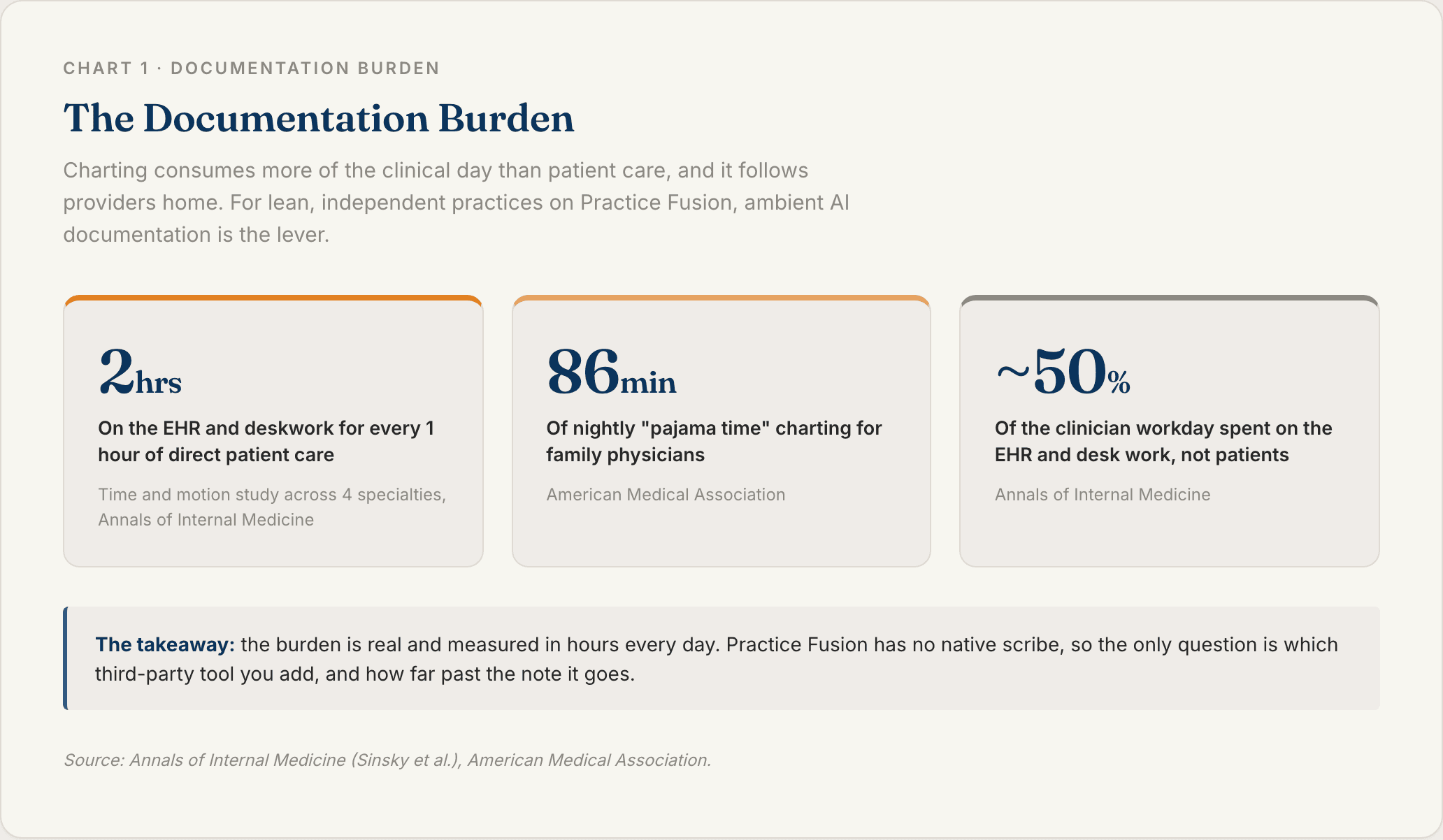
The difference on Practice Fusion is that this is purely a third-party question. There is no native scribe to turn on, so the whole decision is which outside tool to add and how deeply it connects.
Ambient Documentation Versus Manual Charting
The old flow is typing in Practice Fusion during or after the visit. Either way you are still doing data entry.
The ambient flow is listen, draft, review, sign. The difference that matters is the editing tax. A shallow tool dumps one block of text into one field, so you re-format and re-file every note. A good tool maps each section to the right Practice Fusion field, so review takes a minute, not ten.
Practice Fusion Has No Native Scribe, So You Add One
Many EHRs now ship a native ambient scribe. Practice Fusion does not. Its Veradigm sibling has Veradigm Ambient Scribe, but Practice Fusion itself has not launched one as of now [3].
So the decision here is not native versus third-party. It is which third-party tool, and how deeply it integrates. That framing drives the rest of this guide, and it is the question most Practice Fusion scribe pages dance around.
How AI Scribes Connect to Practice Fusion
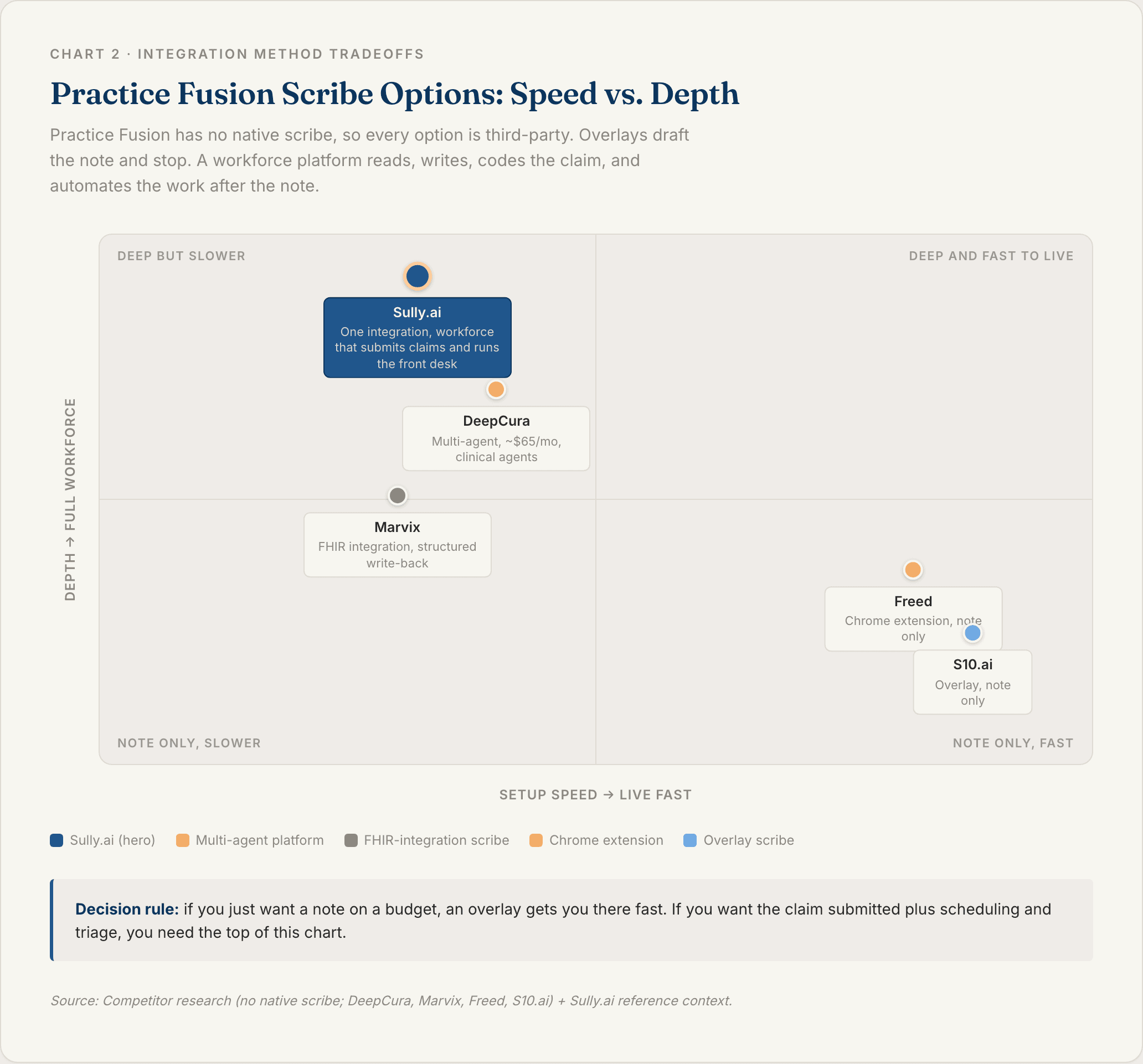
Because there is no native option, the choices are an overlay, a deeper integration, or a workforce platform. The depth decides how much of your workflow a tool can touch.
The key distinction: "integrated" and "bi-directional" are not the same thing. A tool can push a note into Practice Fusion without ever reading anything out of it.
Integration type | Reads patient data in | Writes the note back | Beyond the note | Connection |
|---|---|---|---|---|
Overlay / Chrome extension | No (push-only) | Yes | Limited | Overlay |
Deeper API / multi-agent | Some | Yes | Coding, more | API or agent |
Workforce platform | Yes | Yes | Claims, reception, triage | Deep integration |
Overlay and Chrome-Extension Scribes
The fastest route on Practice Fusion. Tools like Freed and S10.ai run as a Chrome extension or lightweight agent that opens on top of Practice Fusion and writes the finished note into the chart, with no API project, often live in a day [5][6].
These are good for solo and small practices that want speed and low cost. The tradeoff is that an overlay is lighter than a true integration and depends on the screen layout, and it documents. It does not code-to-claim or staff the front desk.
Deeper API and Multi-Agent Options
Some tools go beyond documentation. DeepCura markets a Practice Fusion option with a fast, low-cost setup and clinical agents that do more than a basic note [4].
These add more than documentation. Confirm exactly what each one automates, coding, claims, scheduling, and how it connects, before you commit.
Workforce Platforms
The broadest tier. A workforce platform integrates with Practice Fusion and adds agents across the visit.
Sully.ai integrates with Practice Fusiononce, and then its agents share that connection: the AI Scribe documents, the AI Coder submits the claim, the AI Receptionist handles scheduling, and the AI Triage Nurse runs intake. This is the option that goes past the note.
How to Add an AI Scribe to Practice Fusion Step by Step
Five steps take you from "we should get a scribe" to a validated note in the chart.
1. Confirm Your Practice Fusion Access and Goals
Confirm you are on Practice Fusion and identify your administrator. Since there is no native scribe, decide what you want from a third-party tool: just a note, where a low-cost overlay is the quick win, or coding into claims, scheduling, and triage, which points to a workforce platform.
That goal determines the route.
2. Choose Your Integration Method
Map the methods to that goal. An overlay or Chrome-extension scribe is fastest, cheapest, and documents only. A deeper API or multi-agent tool does more and varies by vendor. A workforce platform handles claims, reception, and triage through one integration.
The decision rule: an overlay is the fast way to get notes, but it stops at the note. If you want the work after the visit handled, the claim submitted plus scheduling and triage, you need a workforce platform.
3. Connect the Scribe
Install the overlay and sign in alongside Practice Fusion, or have the API or workforce vendor connect to your Practice Fusion instance [4][5].
Whichever route you pick, two things are non-negotiable before any patient audio is recorded: a signed BAA and HIPAA-compliant data handling.
4. Map Notes and Coding to Practice Fusion
Configure how each note section maps to the correct Practice Fusion fields, and how codes attach to each problem instead of landing as one block. Overlays simulate the interface; deeper tools write discrete data.
Verify it against the templates you actually use, not a demo.
5. Run a Test Visit and Review the Note
Pick a high-complexity, multi-problem visit as the test. The hardest case is the one that reveals gaps.
Confirm the note lands in the right Practice Fusion sections, codes attach to the right diagnoses, and any downstream items populate. Measure the editing tax: how many edits before signature. Validate before you roll out practice-wide.
What to Look For in a Practice Fusion AI Scribe
Four criteria separate the tools on the shortlist.
Cost and Simplicity
Practice Fusion is a budget EHR for lean practices, so price and setup matter. Overlays are cheap and fast, and some multi-agent tools are also low-cost [4].
Match the spend and the lift to your team, but weigh it against what the tool actually replaces, not just the seat price.
Depth of Integration
Overlay versus true integration. An overlay documents by simulating the screen and depends on the layout. A deeper integration reads and writes structured data and runs more hands-free [5].
Reiterate the editing-tax cost of shallow integration: a tool that only pastes text trades typing for re-filing.
Coding and Work After the Note
Does the tool turn the visit into linked ICD-10 and CPT codes and a clean claim, and handle scheduling and follow-up, or just document? Overlays document. Multi-agent and workforce platforms go further.
This is where the real value sits for a small practice that also does its own billing. Sully pairs its AI Scribe with an AI Coder that extracts every ICD-10 and CPT code and submits clean claims, plus front-desk and triage agents.
Security and HIPAA Compliance
The non-negotiables: HIPAA compliance, a signed BAA, encryption and de-identified PHI handling, MFA, SSO, and limited access.
Keep the security review practical. Ask where audio is processed, how long recordings are retained, who can access transcripts, and whether the vendor will sign your BAA before the pilot starts.
Best AI Scribes for Practice Fusion
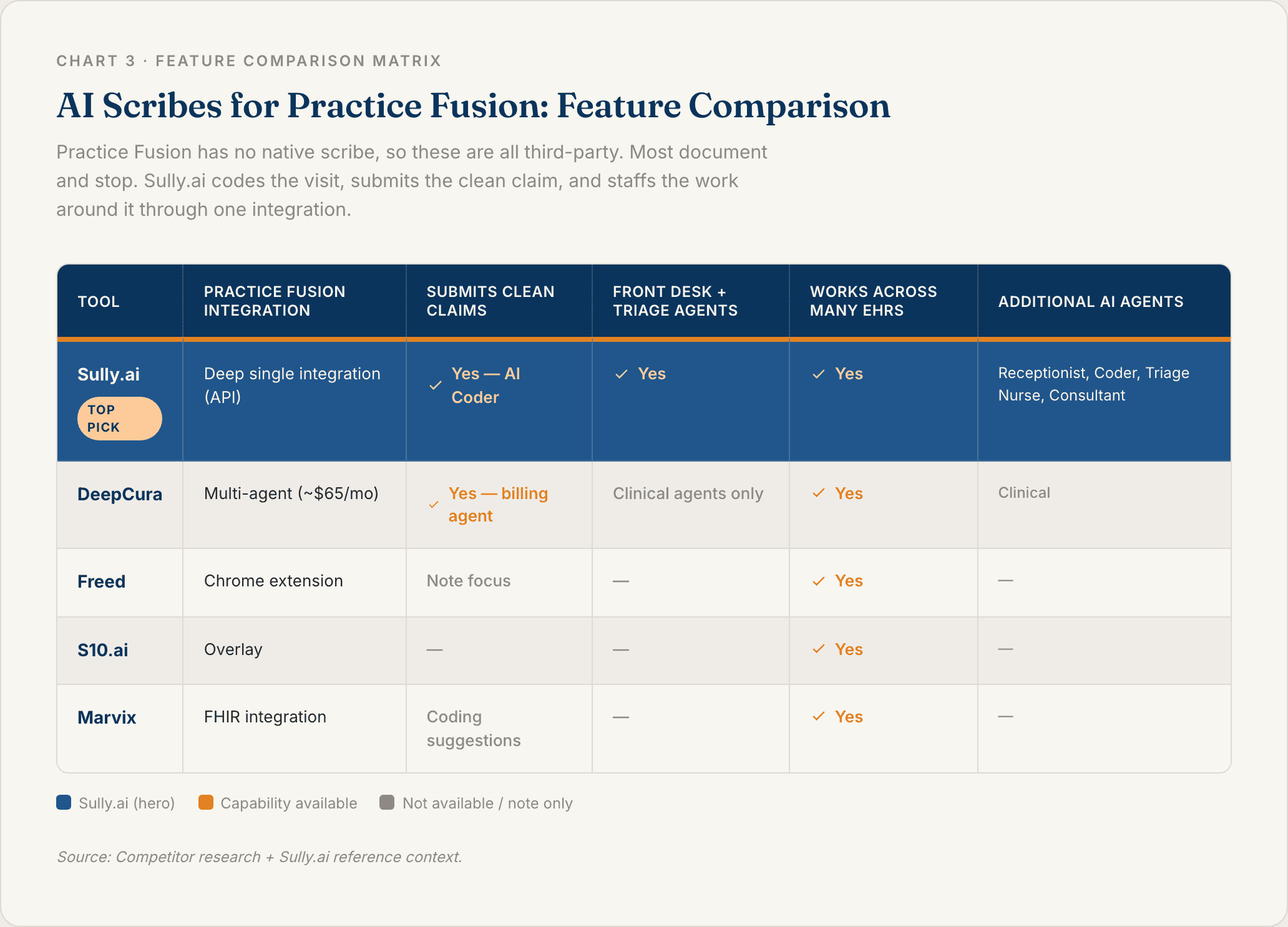
Five tools worth shortlisting. Practice Fusion has no native scribe to list, so these are all third-party.
1. Sully.ai
Sully.ai starts as a strong ambient scribe on Practice Fusion and extends into a coordinated AI workforce through a single deep integration. The AI Scribe documents the visit, then the AI Coder extracts ICD-10 and CPT codes and submits clean claims, the AI Receptionist handles calls and scheduling, and the AI Triage Nurse runs intake and follow-up.
Three things set it apart on Practice Fusion. First, it goes past the note: most Practice Fusion scribes document, while Sully also codes the claim and staffs the front desk and triage. Second, it is one deep integration and a connected workforce, not a stack of overlays bolted onto the screen. Third, breadth and proven scale: Sully integrates with Practice Fusion and also with Epic, Cerner, Meditech, Athenahealth, and more than 20 other EHRs, across 5,000+ providers and 50M+ hours of AI work delivered. Each AI role costs 80 to 90% less than the equivalent human role.
Best fit: Practice Fusion practices that want documentation plus coding-to-claim and the admin work handled by one connected team.
2. DeepCura
A multi-agent option for Practice Fusion with a fast, low-cost setup, about $65 per month with a roughly two-click, minimal-training start, and clinical agents that go beyond a basic note [4].
Standout: affordable and quick to start, with more than documentation. Best fit: budget Practice Fusion practices that want agent automation without a big lift, after confirming exactly which workflows it covers.
3. Freed
A popular ambient scribe that runs as a Chrome extension and pushes chart-ready notes into the EHR, simple and fast [5].
Standout: clinician-loved and low-friction. Best fit: solo Practice Fusion practices that want a lightweight scribe, after confirming current Practice Fusion support.
4. S10.ai
A universal-EHR scribe that overlays the chart and documents into many systems, marketed for fast deployment [6].
Standout: broad EHR support and quick setup. Best fit: practices wanting a cross-EHR overlay scribe, after confirming Practice Fusion support.
5. Marvix
A scribe built around deeper, FHIR-based integration that maps notes to template fields and writes structured data back [7].
Standout: structured write-back where supported. Best fit: practices that want a deeper integration than an overlay, after confirming Practice Fusion support.
Move From a Single Scribe to a Full AI Workforce
Because Practice Fusion has no native scribe, you are choosing a third-party tool anyway, so the real question is how far past the note you want to go.
A cheap overlay gives you the note, but it stops there. The admin load around the visit, coding into a submitted claim, scheduling, intake, follow-up, stays manual, and on a lean Practice Fusion practice the provider is often the biller and the front desk too. The average hospital already runs on about 800 different software tools, and point-solution AI just adds more silos.
Sully takes the connected path. One integration with Practice Fusion, then a team of AI employees, the Scribe, the AI Coder, the AI Receptionist, and the AI Triage Nurse, sharing context across the visit. The Scribe writes the note, the AI Coder extracts every ICD-10 and CPT code, and a clean claim goes out before a denial can occur. Meanwhile the AI Receptionistbooks the follow-up before the provider finishes the next visit. Each AI role costs 80 to 90% less than the equivalent human role, proven across 5,000+ providers and 50M+ hours of AI work.
If you are weighing an AI scribe for Practice Fusion, it is worth seeing what the full team looks like in action.
FAQ
Q: What is a Practice Fusion AI scribe?
A Practice Fusion AI scribe is an ambient documentation tool that listens to the patient visit and drafts a structured clinical note inside Practice Fusion, so the provider reviews and signs instead of typing. Because Practice Fusion has no native scribe, this is always a third-party tool, ranging from lightweight overlays to full AI workforce platforms like Sully.ai that also handle coding, claims, scheduling, and follow-up.
Q: Does Practice Fusion have its own AI scribe?
Not currently. Unlike many EHRs, and unlike its Veradigm sibling, Practice Fusion has not launched a native ambient AI scribe as of early 2026 [3]. To get one, you connect a third-party tool: an overlay scribe, a deeper integration, or a workforce platform.
Q: How do I add an AI scribe to Practice Fusion?
Pick a third-party route (an overlay or Chrome-extension scribe, a deeper API or multi-agent tool, or a workforce platform), confirm your Practice Fusion access, connect it, map notes and coding to your Practice Fusion fields, and validate with a test visit. Overlays can be live in about a day.
Q: What is the cheapest AI scribe for Practice Fusion?
Lightweight overlay scribes are usually the lowest-cost way to add documentation, and some multi-agent tools are also affordable, with DeepCura marketed at about $65 per month [4]. The better lens than price per seat is what the tool replaces: a scribe only documents, while a platform that also codes the claim and handles scheduling and follow-up replaces work you pay people to do today.
Q: Does a Practice Fusion AI scribe handle coding and claims?
A basic overlay scribe documents and may suggest codes, but does not submit claims. To turn the visit into a submitted clean claim plus scheduling and follow-up, you need a multi-agent or workforce platform. Sully.ai's AI Coder extracts every ICD-10 and CPT code and submits the claim through one integration.
Sources
[1] Annals of Internal Medicine (Sinsky et al.)— Allocation of Physician Time in Ambulatory Practice: A Time and Motion Study in 4 Specialties. https://pmc.ncbi.nlm.nih.gov/articles/PMC5593724/
[2] American Medical Association (AMA) — Family doctors spend 86 minutes of "pajama time" with EHRs nightly. https://www.ama-assn.org/practice-management/digital-health/family-doctors-spend-86-minutes-pajama-time-ehrs-nightly
[3] Veradigm — Practice Fusion EHR. https://veradigm.com/practice-fusion-ehr/
[4] DeepCura — AI Scribe for Practice Fusion. https://www.deepcura.com/resources/ai-scribe-practice-fusion
[5] Freed — Freed AI Scribe. https://www.getfreed.ai/
[6] S10.ai — Universal EHR AI scribe. https://s10.ai/
[7] Marvix — AI Scribe EHR Integration: Compatibility, Depth, and What to Look For. https://www.marvix.ai/blog/ai-scribe-ehr-integration
TABLE OF CONTENTS
Hire your
Medical AI Team
Take a look at our Medical AI Team
AI Receptionist
Manages patient scheduling, communications, and front-desk operations across all channels.
AI Scribe
Documents clinical encounters and maintains accurate EHR/EMR records in real-time.
AI Medical Coder
Assigns and validates medical codes to ensure accurate billing and regulatory compliance.
AI Nurse
Assesses patient urgency and coordinates appropriate care pathways based on clinical needs.